Why this check is important
Before setting up an engagement in Emprising, you must confirm that the Client ID is correct and not already assigned to another company or record.
This helps prevent:
- Duplicate Emprising IDs
- Incorrectly assigned Client IDs
- Engagements being linked to the wrong client record
- Downstream setup or reporting issues
The verification process depends on the Client Type shown in the Emprising Fulfillment ticket.
Step 1: Check the Client Type
In the Emprising Fulfillment ticket, check whether the client is classified as:
- New Business
- Renewal
The next steps will depend on the Client Type.
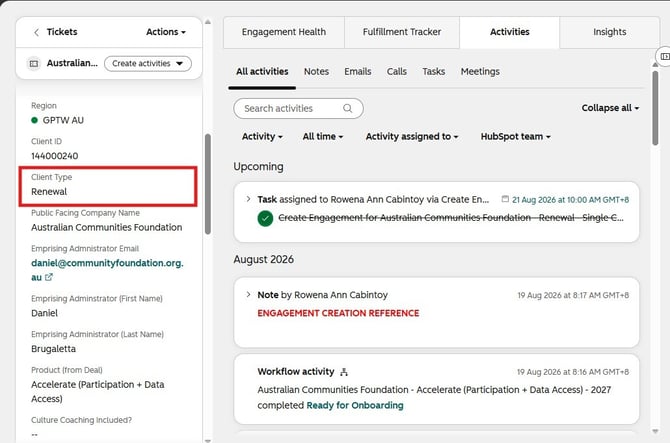
Step 2: If the Client Type is Renewal
For a renewal client, the goal is to confirm that the Client ID in the ticket matches the existing client record in Emprising.
- Check the Client ID provided in the Emprising Fulfillment ticket.
- Go to the Emprising Catalogue of Clients. Make sure you select the correct country or region catalogue.

- Search for the client’s existing company record.
- Check the Client ID associated with the existing Emprising record.
- Compare the Client ID in the ticket with the Client ID in the existing Emprising record.
- If the Client IDs match, you may proceed with the next step of the engagement setup.
- If the Client IDs do not match, do not proceed immediately.
- Confirm which Client ID should be used, then update the Emprising Fulfillment ticket with the correct Client ID before continuing.
Step 3: If the Client Type is New Business
For a new business client, the goal is to confirm that both the company record and Client ID are not already in use.
- Go to the Emprising Catalogue of Clients. Make sure you select the correct country or region catalogue.
- Search for the company using a partial company name or key name variations. Do not rely only on the full legal company name, as the search may look for an exact match and miss existing records. To reduce the risk of false negatives, try searching by:
- The most distinctive word or words in the company name
- Common abbreviations
- Parent company name
- Spacing or punctuation variations
- Shortened versions of the company name
- Check whether an existing company record appears in the search results.
- If no existing company record is found, proceed to the next verification.
- Search the Client ID provided in the Emprising Fulfillment ticket.
- Check whether the Client ID is already associated with another company or existing record.
- If the Client ID is not in use, you may proceed with the next step of the engagement setup.
- If the Client ID is already associated with another company or record, do not proceed using that ID.
- Confirm the next available or correct Client ID.
- Update the Emprising Fulfillment ticket with the correct Client ID.
- Recheck the updated Client ID in the Emprising Catalogue of Clients to ensure it is not already in use.
Important reminder
Always verify both the company record and the Client ID before proceeding.
This ensures that the engagement is linked to the correct client record and helps prevent duplicate or incorrectly assigned Emprising IDs.